Tests for Just the Docs
Various tests illustrate how the theme renders various elements.
The following sections are a log of the creation of this website, with links to some relevant resources.
Bug reports and suggestions for improvement are welcome!
Table of contents
Create a Jekyll site on GitHub Pages
- Shell:
jekyll new just-the-docs-tests ... cd just-the-docs-tests bundle exec jekyll serve - Browser: http://localhost:4000
- Shows the site home page with
Minimalayout
- Shows the site home page with
- GitHub Desktop:
- Create repository
just-the-docs-tests
- Create repository
- Shell:
git config user.email ...@users.noreply.github.com - GitHub Desktop:
- Publish repository
just-the-docs-tests
- Publish repository
- Browser: GitHub repository: Settings:
- GitHub Pages: Source:
master(Save) - Change repository visibility:
public
- GitHub Pages: Source:
- Browser: https://pdmosses.github.io/just-the-docs-tests/
- The site appears on GitHub Pages
Use Just the Docs as a remote theme
- Edit
_config.yml:title: Testing Just the Docs # email: your-email@example.com description: >- # this means to ignore newlines until "baseurl:" This site tests some features of Just the Docs, a remote theme for Jekyll on GitHub Pages. baseurl: "/just-the-docs-tests" # the subpath of your site, e.g. /blog url: "" # the base hostname & protocol for your site, e.g. http://example.comReplace the Minima theme by Just the Docs Jekyll remote theme:
# Build settings
# theme: minima
remote_theme: pmarsceill/just-the-docs
plugins:
  - jekyll-feed
  - jekyll-remote-theme
Avoid need for
layout: defaultindocspages using Jekyll front matter defaults:defaults: - scope: path: "docs" # an empty string here means all files in the project values: layout: "default"Warning: Using
path: ""above corrupts files in theassetsfolder (also when restricted totype: "pages"). - Edit
Gemfile: replace the Minima theme by Just the Docs remote theme# Happy Jekylling! gem "jekyll", "~> 4.1.1" # This is the default theme for new Jekyll sites. You may change this to anything you like. # gem "minima", "~> 2.5" gem "jekyll-remote-theme" gem "just-the-docs"Warning: The
github-pagesgem currently requires Jekyll 3, and cannot be installed together with Jekyll 4. - Files:
- delete
about.markdown - update
index.markdown - add
README.md - add
docs/index.md - add
docs/grandchildren/* - add
_includes/head_custom.htmlto preventfavicon.icorequests<link rel="icon" href="data:,">
- delete
- Shell:
bundle install bundle exec jekyll serve - Browser: http://localhost:4000/just-the-docs-tests/
- Shows the site home page with Just the Docs layout
- GitHub Desktop:
- Push
- Browser: https://pdmosses.github.io/just-the-docs-tests/
- The site appears on GitHub Pages
- The site is automatically built using Jekyll 3.8.5
Use Jekyll Actions on GitHub Pages with Jekyll 4
Jekyll Actions, Jekyll Actions Demo, Deploy your Jekyll blog using Github Pages and Github Actions
The Gemfile is used by the action, so make sure it is not in .gitignore (in contrast to Gemfile.lock, which should be ignored by git).
N.B. The following steps overwrite the gh-pages branch!
- Browser: GitHub repository: Actions:
- Click on the link to
set up a workflow yourself - Change the file name from
main.ymltogithub-pages.yml -
Replace the file contents by the following YAML code from Jekyll Actions
name: Build and deploy Jekyll site to GitHub Pages on: push: branches: - master jobs: github-pages: runs-on: ubuntu-16.04 steps: - uses: actions/checkout@v2 - uses: helaili/jekyll-action@2.0.3 env: JEKYLL_PAT: ${{ secrets.JEKYLL_PAT }} - Optional: replace
ubuntu-16.04byubuntu-latest - Optional: replace
helaili/jekyll-action@2.0.3byhelaili/jekyll-action - Click
Start committhenCommit new file
- Click on the link to
- Browser: GitHub profile: Developer Settings: Personal Access Tokens
- Click
Generate new token - Note:
GitHub Actions - Select scopes:
repo - Click
Generate new token - Copy the displayed token
- Click
- Browser: GitHub repository: Settings: Secrets:
- Click
New secret - Name:
JEKYLL_PAT - Value: Paste the token
- Click
Add secret
- Click
- Browser: GitHub repository:
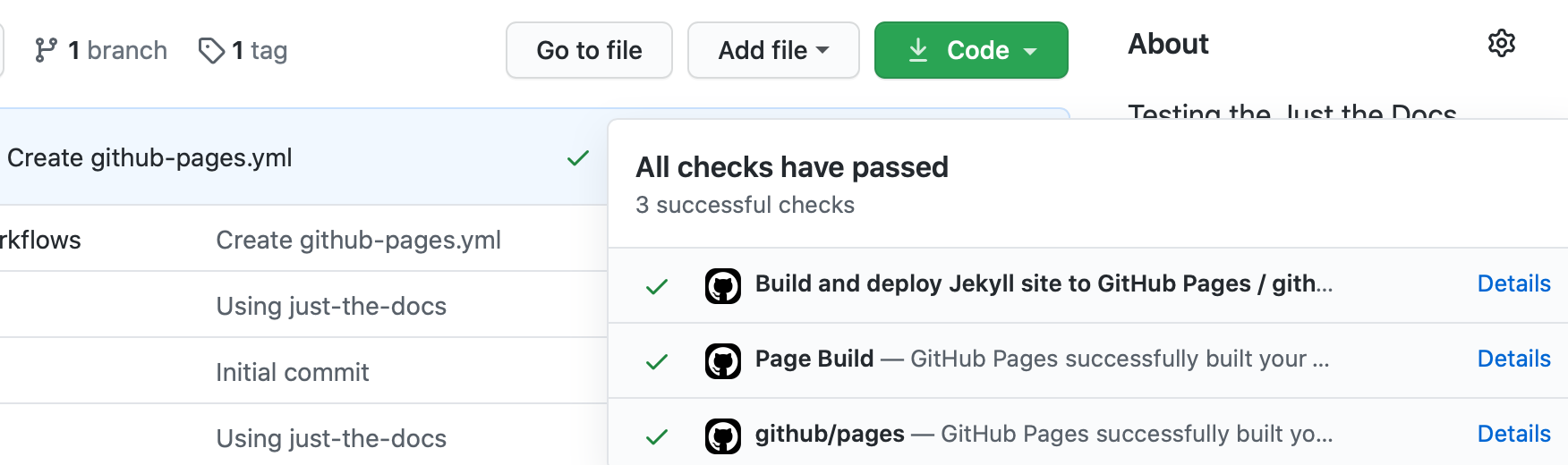
- Click on the status symbol (tick or X) in the latest commit information
- Click on
Details - A successful build:
- Browser: https://pdmosses.github.io/just-the-docs-tests/
- The site appears on GitHub Pages
- The site is now built using Jekyll 4, as specified in
Gemfile